 Nerdy
Immersive Learning Playbook Canvas
The Immersive Learning Playbook Canvas fits a whole coaching playbook on one board: the learning objective, the purposes behind it, the evidence that it’s taking hold, what a team needs before it starts, and the plays in rough order. We built it for dojo coaches designing immersive learning challenges, and it works just as well for a workshop series or a platform enablement campaign.
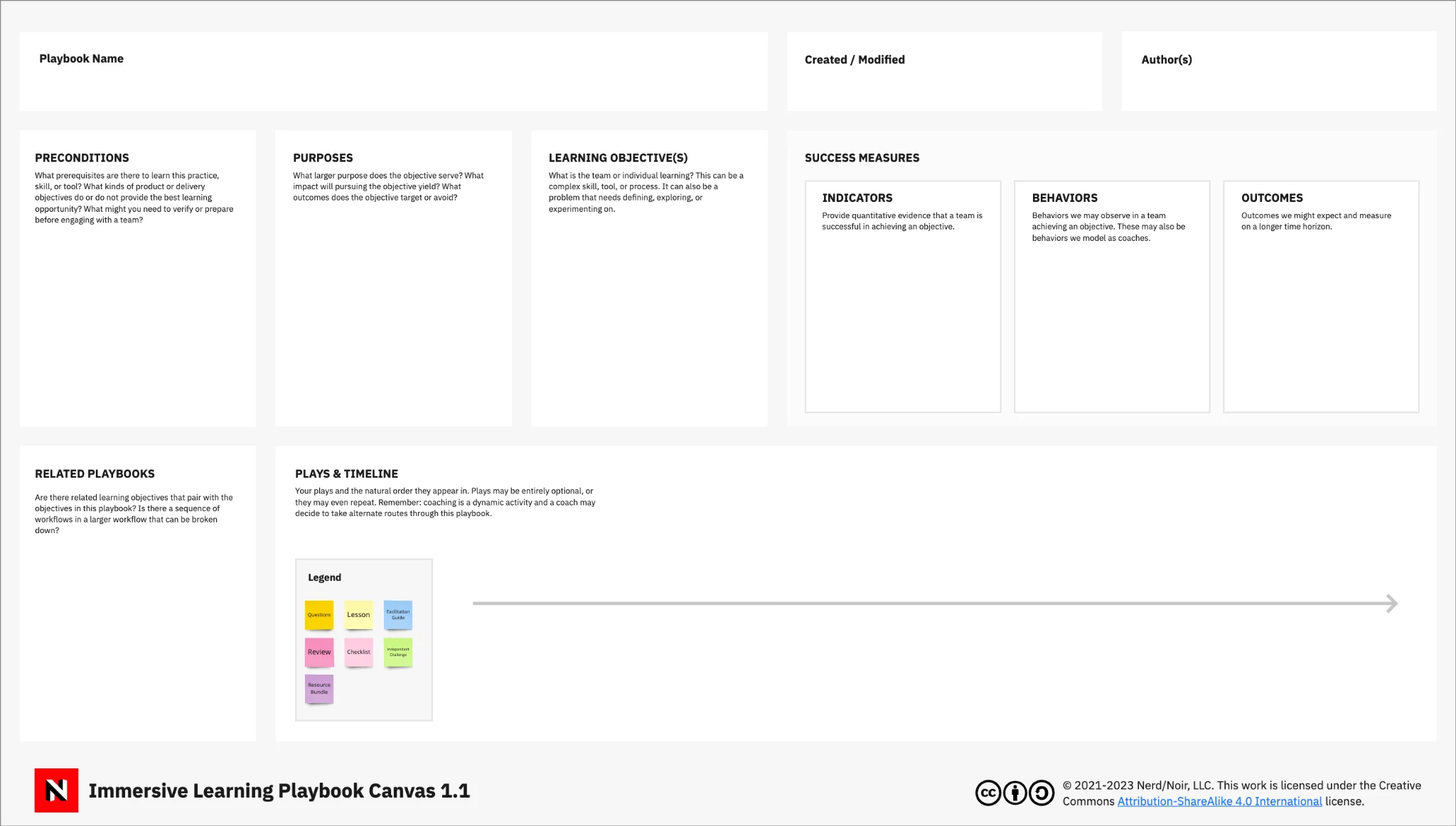
Grab the Miro template and fill it in the order below. It’s the order we use at Nerd/Noir: objective first, then push left to purpose, push right to success measures, then the plays.
1. Name and Learning Objective
Start with what the team will learn. Which skill, tool, or practice will they get fluent in during the challenge? Which problems will it let them solve? What can they do afterward that they can’t do now?
- Write the objective in the learner’s words. How would they describe what they want to learn? If there are several ways to say it, note them all.
- Name the playbook after the objective. A playbook that helps product owners run discovery with their teams is called “Collaborative Discovery,” and so is its objective.
- Check the size. Does the objective fit an immersive learning challenge? Is it days of work, weeks, or months?
2. Purposes and Success Measures
Push left on purpose. Why learn this at all, and what does the learning buy the team? Ask “why” until you hit real value. Why learn TDD? It makes code easier to change. Why does that matter? It makes onboarding faster, and it lets the code keep up with what the team learns. That’s two purposes for one playbook.
Then push right on success measures, the evidence that learning is taking hold and paying off. The canvas splits them three ways, and you want at least two of each:
- Indicators. Evidence that the team is getting fluent. A discovery playbook might set “every idea validated with three to five customers.”
- Behaviors. What you’d see a fluent team do. Include your own: which behaviors will you model as a playing coach?
- Outcomes. The benefits that show up over a longer horizon. These are often states or conditions you can measure with a Likert-scale survey (strongly agree to strongly disagree). Pick the audience on purpose: users, customers, the team, specific roles, or stakeholders.
3. Preconditions and Related Playbooks
Preconditions say what has to be true before a team can run the playbook. Which tools and environments have to be in place? Does the team need a baseline of skill (beginner, intermediate, advanced)? Which questions in intake, during consultation and framing, tell you whether this playbook fits the group at all?
Related playbooks tie yours to the rest of the practice. A playbook works best with a clear mission and a clear boundary, so use this box for what sits outside it: playbooks a team might run before, after, or alongside yours, alternative objectives the team could pick instead, and practices that pair well with it.
4. Plays and Timeline
Plays tend to build on one another toward the objective, so lay them out in rough order along the timeline.
- Make a legend. The template ships with seven play types, each its own sticky color: Questions, Lesson, Facilitation Guide, Review, Checklist, Independent Challenge, and Resource Bundle. Invent your own types if those don’t fit.
- Keep the order rough. A playbook isn’t a curriculum. Mark the evergreen plays that run every time apart from the ones you only call in certain situations.
- Don’t force a line. The sequence might be a loop inside the challenge, like the Dojo Loop. Different teams take different paths through the same playbook.
- Map plays onto the whole engagement. Some plays belong in intake (a questionnaire), some during the challenge, and some after the team exits.
Examples
The Coaching Playbooks page lists finished playbooks built on this canvas, including adopting TDD and running a Design Sprint.
License
The canvas and this guide are © 2018-2023 Nerd/Noir, LLC, licensed under Creative Commons Attribution-ShareAlike 4.0 International. Use it, change it, and share what you make under the same terms.
Resources
- Immersive Learning Playbook Canvas 1.1 — the Miro template
- Coaching Playbooks — how to keep a playbook light enough to be useful
- Dojo Loop — the cadence most dojo plays fit into
- Experiential Learning — the engagement model the canvas was built for